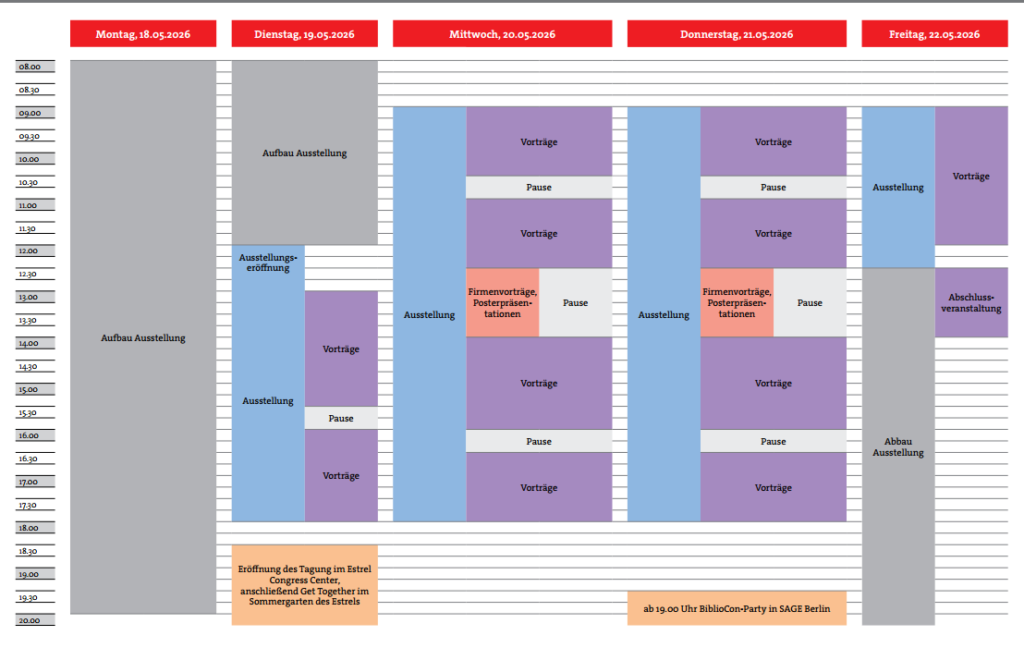
Click here to view a detailed online program overview.
The session planner provides you with an overview of all sessions on the selected conference days and their contents. It is easy and intuitive to use.
Please note that you must be logged in to save your personal calendar. To do this, click on Log in in the left menu bar.
To view session content, please click on the desired session to open a window with the content and individual presentations.
By clicking on the favorites icon (upper right corner) within a window, you can add the selected session(s) to your personal session schedule.
You can view your saved favorites via the left menu bar – Favorites. A special feature here is that you can download your appointments as a PDF file and print them out and/or enter them directly into your calendar.
You can use the left column to show or hide individual days, session types, and/or rooms. This allows you to filter the program according to your interests.
There is also a search field in the left-hand column, which you can use to easily find specific content.
You can also log in to the congress app later using this user profile, giving you access to your favorites and appointments.
Streaming will also be accessible via the conference app after logging in with your user profile.